


ld be something common you’re facing – you pick up your phone, enter a password you’ve used countless times, and nothing happens. After a few more attempts, the screen goes black and a message appears on the screen that makes you feel a panic: “iPhone is unusable” or “Security locked”. Maybe you changed a new password and forgot it. Maybe you’re so used to facial recognition technology that the numbers just slip out of memory.
Or maybe you bought a used iPhone and found that the previous owner’s Apple account was still tied to the device. Or maybe you set a Screen Time passcode for your child and you can’t change it now. Even the iTunes backup password becomes blurry. Each such lock turns your device into a frustrating brick.
Don’t worry, FoneTool Unlocker can easily help you solve these problems and remove these locks directly from your computer without going to an Apple store to make an appointment.


Why Choose FoneTool Unlocker to Unlock Your iPhone?
Instead of searching for different fixes for different locks, this software packs five key abilities into one clean interface. Here’s what makes it useful:
ü Remove Any iOS Screen Passcode – Including four-digit, six-digit, custom alphanumeric combinations, TouchID or FaceID passcodes.
ü Bypass iCloud Activation Lock – It can be helpful when the used iPhone you buy is still linked to the original owner’s iCloud account.
ü Remove Apple ID from iPhon without Password – This feature is great for handling used iPhones.
ü Erase Forgotten Screen Time Passcode – Keep your photos and information safe while also helping you manage the time you spend on your phone.
ü Decrypt iTunes Backup Files – Remove with this free iPhone unlocker when you forget the encryption password.
FoneTool Unlocker’s R&D team has more than fifteen years of professional experience, all dedicated to bringing users the safest and simplest iOS device unlocking experience. Its interface is designed to be simple and easy to understand, so you don’t need any technical background to operate. Your data is protected with 256-bit SSL encryption technology during use, ensuring security.
Step by Step Guide – Remove a Forgotten Screen Passcode
I will explain in detail how to use FoneTool Unlocker to unlock an iPhone when you have forgotten the screen password you set.
What you’ll need: a Windows PC, a USB cable, and about 10 minutes.
Step 1. Download FoneTool Unlocker and install it on your computer. Connect your locked iPhone to the computer using a USB cable.
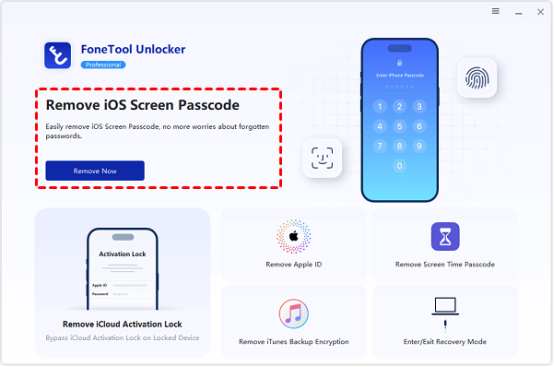
Step 2.Launch the program, on the main control panel, tap “Remove iOS Screen Passcode” and then tap “Remove Now”. Don’t worry, this won’t do anything until you confirm later.

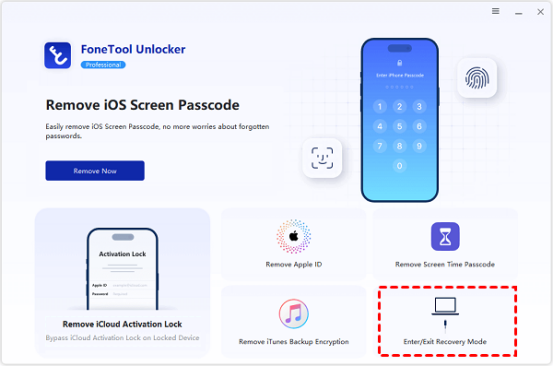
Step 3. Follow the on-screen prompts to continue the operation, and then you can put your iPhone into recovery mode with one click via Enter/Exit Recovery Mode.

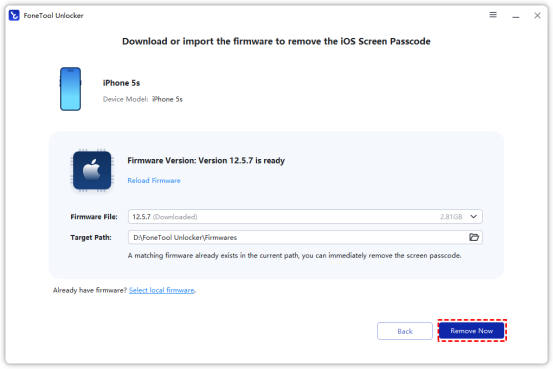
Step 4. FoneTool Unlocker will automatically recognize your device model, please download the corresponding firmware. Then tap “Remove Now” in the bottom right corner to start erasing your iPhone’s screen passcode.

Other Locks You Can Remove in Minutes
FoneTool Unlocker can also handle more iPhone locked situations in the same concise way:
1. Remove Apple ID – Select the feature, follow the prompts, and FoneTool Unlocker will log out the old Apple account so that you can add a new one. Ideal for phones that still retain the previous owner’s account.
2. Remove iCloud Activation Lock – If you buy a used iPhone that is still tied to the original owner’s iCloud, this feature allows you to bypass the lock screen and re-enter the device.
3. Remove Screen Time Passcode – No need to worry about data loss. Once you select the option, the software will remove the restriction password and you will be able to regain control over the app’s usage restrictions and content filtering settings.
4. Remove iTunes Backup Encryption – Forgot the password used to encrypt your backups? The tool de-encrypts the state, allowing you to create new backups or restore old ones without restrictions.
Summary
If you can’t unlock your iPhone, FoneTool Unlocker provides you with a reliable and computer-based way to remove the screen passcode, iCloud activation lock, Apple ID without password, Screen Time restrictions, and iTunes backup encryption.
With clear steps, a clean interface, and no need to be a technical expert, it provides a practical solution the next time you’re stuck with a bad memory.